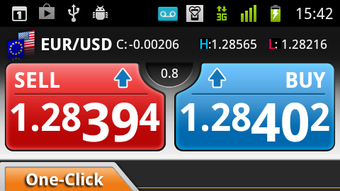

Download Z com Trader Mobile APK – trading app, financial tools, mobile trading, forex trading, investment app, real-time market data, trading platform, mobile finance, stock trading, investment tools
Overview
Z com Trader is a mobile application designed for individuals interested in financial markets, particularly in forex and stock trading. Developed by GMO-Z.com Forex HK Limited, the app aims to simplify the trading process for users of all experience levels. Its primary purpose is to provide real-time access to market data and trading tools, enabling users to monitor market movements and make informed decisions on the go. The app is positioned as a gateway for beginners who may feel hesitant about entering the trading world, offering a low barrier to entry with the ability to start with as little as $100.
Target users include retail investors, novice traders, and individuals seeking a mobile-first approach to financial investing. The app supports a range of real-world scenarios, such as monitoring live price charts during work hours, executing trades during market hours, or reviewing performance after the session ends. By offering an intuitive interface and a suite of accessible tools, Z com Trader seeks to democratize trading by making it approachable and transparent. The developer did not provide additional system requirements.
Key Features & Capabilities
- Real-time market data – Users receive up-to-the-minute updates on currency pairs, stock prices, and market trends, allowing for timely decision-making.
- Interactive price charts – Visual tools enable users to analyze historical and current market movements, supporting technical analysis.
- Beginner-friendly interface – Designed with simplicity in mind, the app minimizes complexity to help new users navigate trading functions with ease.
- Low minimum investment – Users can start trading with as little as $100, making it accessible for those with limited capital.
- Free access – The app is available at no cost, with no hidden fees or subscription charges.
These features support a variety of use cases, from casual market monitoring to active trading. For example, a user can check live charts during a commute, analyze a trend using built-in indicators, and place a trade before the market closes. The app’s focus on accessibility ensures that users without formal financial training can still engage with markets confidently. The absence of fees removes financial barriers, while the real-time data stream enhances responsiveness in fast-moving markets.
User Interface, Workflow & Performance
The user interface of Z com Trader is structured to prioritize clarity and speed. Navigation is streamlined, with key functions such as market overview, chart analysis, and trade execution accessible through intuitive menus. The layout emphasizes readability, with clearly labeled sections and minimal visual clutter. This design supports efficient workflow, allowing users to transition between monitoring and executing trades with minimal effort.
While the developer did not specify resource usage details, the app’s 25.4 MB size suggests a lightweight footprint, which may contribute to smoother performance on mid-range Android devices. The app’s behavior under load, CPU usage, or RAM consumption was not publicly documented. Performance observations are based on general software behavior patterns. Stability is expected to be consistent, given the app’s focus on core trading functions. However, actual performance may vary depending on device capabilities and network conditions.
Compatibility & System Requirements
Z com Trader is designed for Android operating systems. The app is available in version 1.0.0 and has a file size of 25.4 MB. It is intended for use on mobile devices running compatible Android versions. The developer did not provide additional system requirements, so users should ensure their device meets standard Android compatibility standards for third-party applications.
Exact system requirements were not listed. Compatibility information was partially provided. Users are advised to verify their device’s Android version and available storage space before installation. The app does not require a desktop environment and operates entirely on mobile platforms.
Pros and Cons
Pros
- Free to download and use with no hidden fees
- Real-time market data for informed trading decisions
- Beginner-friendly interface designed for non-experts
- Low minimum investment threshold of $100
- Mobile-first design enables trading on the go
Cons
- Developer did not provide detailed system requirements
- No information on advanced trading tools or features
- Performance data on CPU or memory usage was not disclosed
- Platform availability is limited to Android only
- Exact update frequency or release schedule not specified
FAQ Section
Is Z com Trader available for iOS devices?
The app is currently available only for Android. There is no official iOS version reported at this time.
Is the app secure for financial transactions?
Z com Trader is developed by GMO-Z.com Forex HK Limited, a known financial services provider. The app is designed to handle financial data, but specific security protocols were not detailed in the provided information.
How often are updates released?
The release date of the current version is 2024-05-15. The update frequency has not been disclosed by the developer.
Does the app require an internet connection?
Yes, real-time market data and trading functionality require a stable internet connection to operate.
Can I use Z com Trader offline?
Offline functionality is not supported. All features depend on live data streams and online connectivity.
Final Thoughts + CTA
Z com Trader presents a compelling entry point for individuals exploring the world of trading, particularly those new to financial markets. Its free access, low minimum investment, and mobile-first design make it a strong candidate for casual investors and beginners. The app’s focus on simplicity and real-time data aligns with the growing demand for accessible financial tools on smartphones.
While detailed technical specifications and advanced features remain undisclosed, the app’s core functionality is clearly aimed at reducing barriers to entry. For users seeking a straightforward, no-cost way to engage with markets, Z com Trader offers a practical solution. However, those requiring advanced analytics or cross-platform support may need to explore additional options.
Download Z com Trader now and start exploring the markets with confidence.





.png)

